%20with%20its%20geometry%20untouched.%20The%20conversion%20is%20mechanical%20and%20scripted,%20not%20retyped:%20the%20CorelDRAW%20wrapper%20is%20dropped%20(DOCTYPE,%20millimetre%20width/height,%20editor%20metadata,%20generated%20ids)%20and%20each%20`class='filN'`%20is%20replaced%20by%20the%20exact%20fill%20its%20CDATA%20block%20declared.%20Brand%20ink%20is%20%2325175C%20and%20the%20mark%20is%20%232D75EF.%20Do%20not%20hand-edit%20the%20paths;%20re-export%20from%20the%20brand%20assets%20if%20the%20mark%20changes.%20--%3e%3cg%3e%3cg%3e%3cpolygon%20fill='%2325175C'%20points='23.79,7.27%2016.02,7.27%2016.02,36.04%207.77,36.04%207.77,7.27%20-0,7.27%20-0,0.3%2023.79,0.3%20'/%3e%3cpath%20fill='%2325175C'%20d='M83.77%2036.04l0%20-23.89%207.71%200%200%203.75c0.75,-1.47%201.75,-2.58%203,-3.33%201.07,-0.68%202.45,-1.02%204.12,-1.02%200.89,0%201.74,0.13%202.52,0.38l-0.43%207.23c-1.07,-0.57%20-2.23,-0.86%20-3.48,-0.86%20-1.57,0%20-2.86,0.53%20-3.85,1.6%20-1.25,1.32%20-1.88,3.46%20-1.88,6.43l0%209.7%20-7.71%200z'/%3e%3cpolygon%20fill='%2325175C'%20points='105.41,11.97%20113.67,11.97%20113.67,36.04%20105.41,36.04%20'/%3e%3cpolygon%20fill='%2325175C'%20points='116.24,12.15%20124.7,12.15%20130.75,24.95%20136.8,12.15%20145.27,12.15%20133.17,36.04%20128.34,36.04%20'/%3e%3cpath%20fill='%2325175C'%20d='M165.92%2014.82l0%20-2.67%207.72%200%200%2023.89%20-7.72%200%200%20-2.89c-2.45,2.54%20-3.97,2.89%20-7.07,2.89%20-3.69,0%20-6.9,-0.92%20-8.96,-2.84%20-2.47,-2.3%20-3.48,-5.45%20-3.48,-8.95%200,-3.97%201.24,-7.18%203.7,-9.65%202.18,-2.18%204.95,-3.27%208.3,-3.27%203.29,0%205.8,1.16%207.51,3.48zm-5.57%203.16c-1.68,0%20-3.09,0.57%20-4.24,1.72%20-1.18,1.18%20-1.76,2.63%20-1.76,4.34%200,1.71%200.53,3.14%201.6,4.29%201.18,1.24%202.69,1.88%204.55,1.88%201.58,0%202.92,-0.55%204.03,-1.66%201.24,-1.18%201.88,-2.68%201.88,-4.5%200,-1.82%20-0.59,-3.29%20-1.77,-4.4%20-1.15,-1.11%20-2.58,-1.66%20-4.29,-1.66z'/%3e%3cpath%20fill='%232D75EF'%20d='M43.82%2019.71l-14.27%200.06c0.64,-3%203.44,-5.4%207.04,-5.45%203.82,-0.05%206.37,2.25%207.23,5.39zm9.03%2016.09l6.24%20-0.01%20-0.08%20-12.93%20-6.26%206.24%200.1%206.7zm-3.8%20-19c-0.24,-2.27%20-2.73,-4.69%20-4.05,-5.66%20-1.78,-1.31%20-4.3,-2.31%20-6.89,-2.54%20-6.29,-0.53%20-10.53,2.31%20-12.92,5.82%20-5.79,8.48%20-0.65,21.68%2011.86,21.3%204.98,-0.16%209.33,-2.84%2012.32,-6.56%201.59,-1.96%202.81,-3.05%204.6,-4.91%201.97,-2.06%207.1,-8.47%209.84,-9.22%202.75,-0.76%205.49,0.41%206.68,2.28%201.66,2.63%200.5,14.4%200.87,18.52l6.45%20-0.09c-0.01,-4.09%20-0.17,-9.41%20-0.16,-13.27%200.02,-4.06%20-0.49,-7.52%20-2.77,-9.9%20-5.08,-5.29%20-13.05,-5.2%20-17.82,-0.8l-12.41%2012.88c-1.73,1.8%20-3.75,4.91%20-7.79,5.09%20-3.94,0.18%20-6.55,-2.25%20-7.39,-5.47%202.29,0%204.56,0%206.84,0%202.34,0%204.44,0.43%205.78,-0.86l6.96%20-6.59z'/%3e%3cpath%20fill='%2325175C'%20d='M109.55%200c2.25,0%204.06,1.82%204.06,4.06%200,2.26%20-1.82,4.07%20-4.06,4.07%20-2.26,0%20-4.07,-1.82%20-4.07,-4.07%200,-2.25%201.82,-4.06%204.07,-4.06z'/%3e%3c/g%3e%3c/g%3e%3c/svg%3e)
Platform The request is the record.
Tenriva coordinates the requests, approvals and records behind joiner, mover and leaver changes, for organisations using Microsoft Entra ID and Microsoft 365.
Everything on this page is available today.
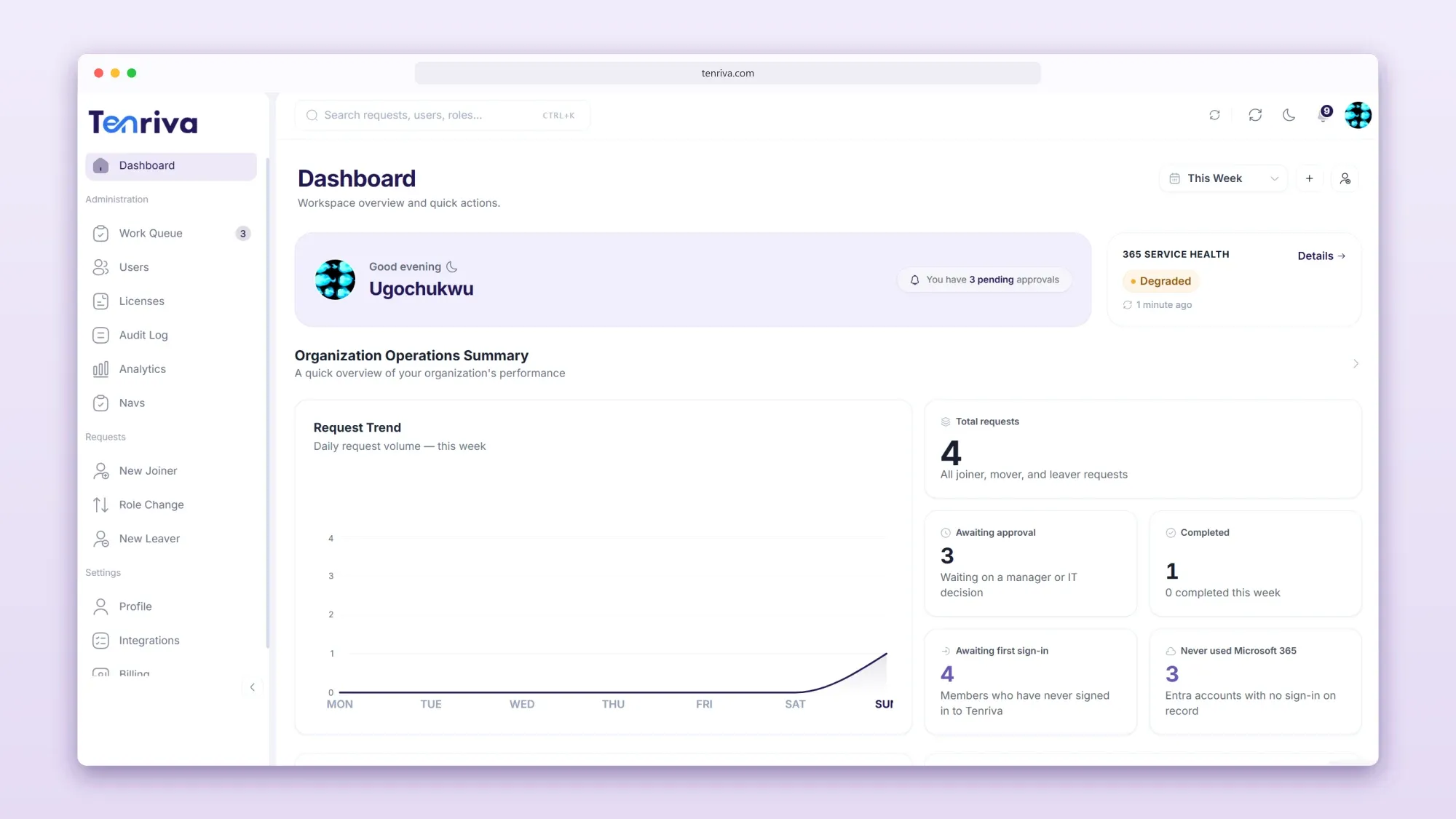
Lifecycle requests
Every employee change starts as one structured request.
A joiner, a promotion and a resignation are three different conversations and one shape of work. Tenriva gives each of them a request that records what IT needs, in fields rather than in an email.
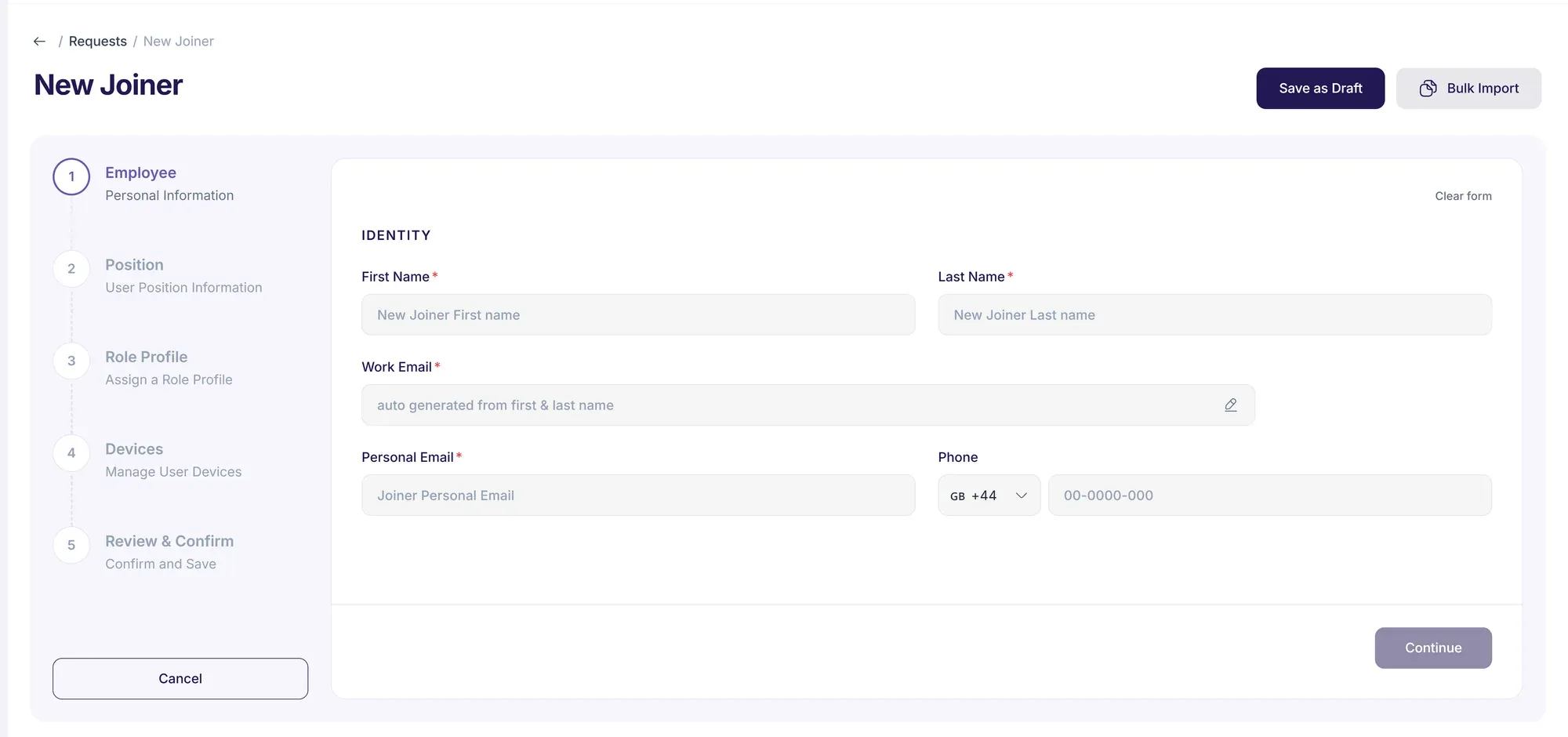
Access should be there on day one.
A joiner request gives IT the start date, department, manager and role profile.
A joiner request records
- Start date
- Department
- Manager
- Role profile
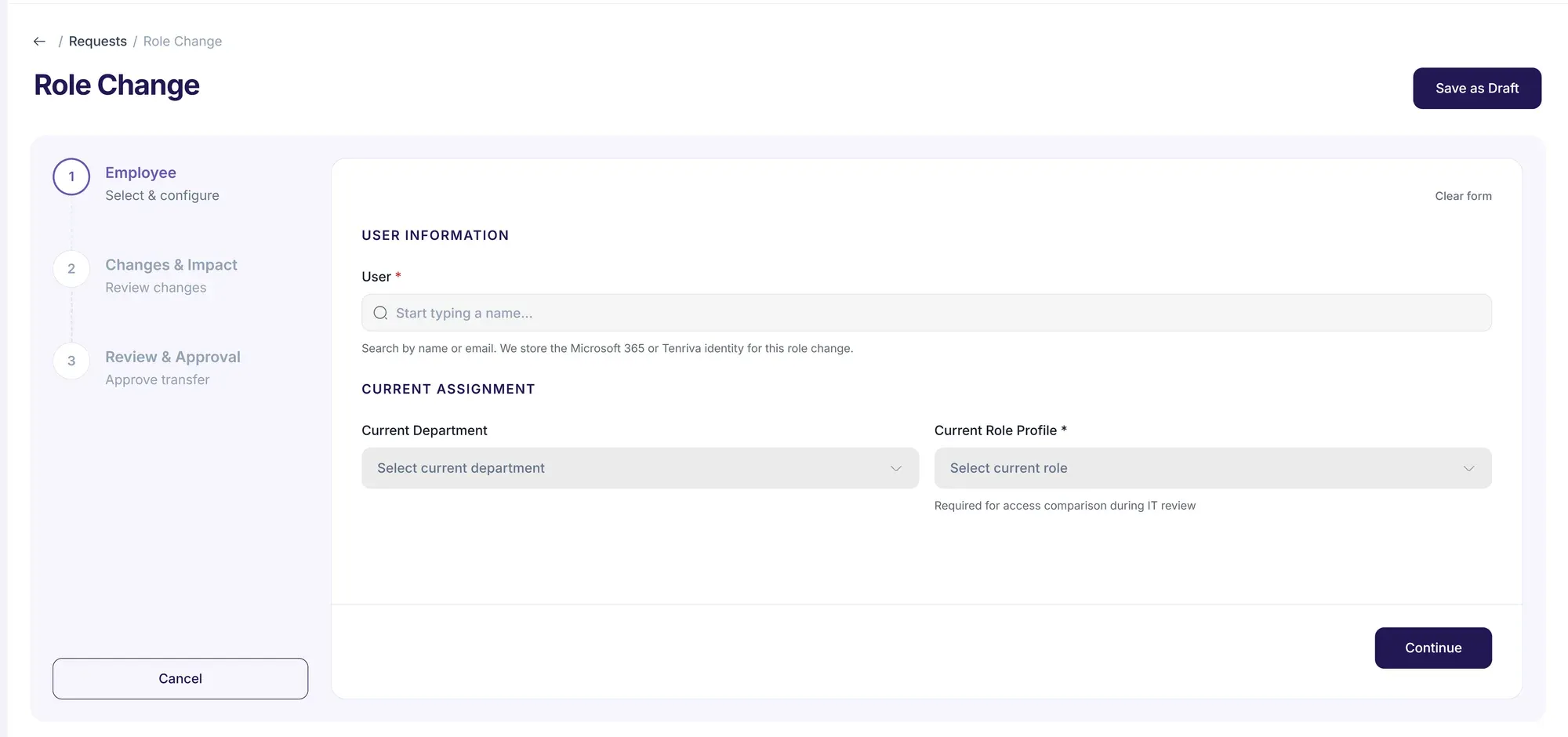
Access should change with the role, not pile up.
A mover request records the new role, department or manager and the date it takes effect. The role profile describes what the new role should have.
A mover request records
- The new role, department or manager
- The date it takes effect
- The role profile for the new role
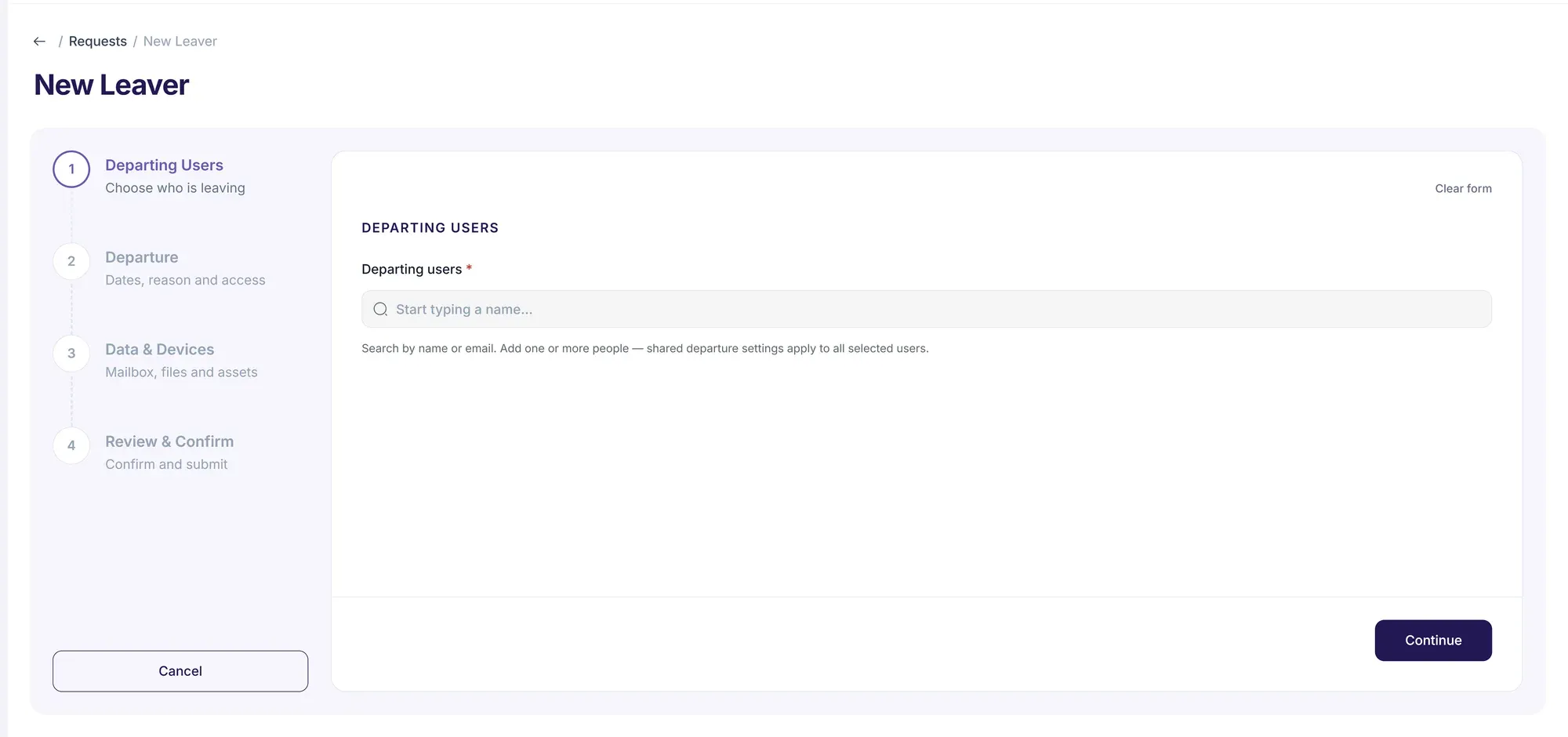
Access should end when they do.
A leaver request records the last working day and how their mailbox and devices should be handled.
A leaver request records
- Last working day
- The reason for leaving
- How the mailbox and devices are handled
Role profiles
Describe a role once. Every request for it starts from the same baseline.
Without a baseline, every request is assembled from memory and the answer drifts between one starter and the next. A role profile makes the expected shape of a role explicit, so a request begins from it rather than from whoever happens to be on shift.
- Licences
- What the role should be assigned.
- Groups
- The security and distribution groups it belongs to.
- Teams
- The Teams the role works in.
- Policies
- The policies that should apply to it.
A request always shows what the profile would apply, and the manager and IT approve it before anything changes.
Approvals
Nothing moves until the right people have said so.
The route is the same for every request, so a reader of the audit history six months later can see exactly which gates a change passed through.
HR or the manager
Request raised
The change is recorded with the dates, the role and the people involved.
The manager
Manager approval
The employee’s manager confirms the change is right before IT sees it.
IT
IT review
IT checks what the request would do and what the role profile would apply.
IT, optionally
Second sign-off
A second IT approval, for teams that want one on higher-risk changes.
Optional. Teams that need a second pair of eyes turn it on.
The work queue
Ready to carry out
The request reaches IT’s queue with every decision attached to it.
Work queue
One queue for every lifecycle request.
Requests sit in lanes by stage, so IT can see what is waiting on a manager, what is theirs to action and what has slipped past its service level, without asking anyone.
- Which stage every request is at
- What is over its service level
- Which requests have no owner set

Records and visibility
The decisions are kept, not reconstructed.
The same request that carried the change carries its history, and what is in front of you is what exports.

Audit history
Keep a record of requests, approvals and actions, and export the entries you are viewing as CSV or PDF.
Licence insights
See licensed accounts that have not been used in the last 30, 60 or 90 days.
Device inventory
View devices managed in Microsoft Intune.
Analytics
Review sign-in activity, provisioning runs, application adoption and Microsoft 365 seat allocation across your organisation, over a chosen period.
Microsoft 365
A governance layer, not a replacement identity provider.
Tenriva is designed to work with Microsoft Entra ID and Microsoft 365 through Microsoft Graph. People sign in with their existing Microsoft work account.
Microsoft Entra ID
Your existing identity. Tenriva does not replace it.
Tenriva
Requests, approvals and the record of every decision.
Users
Accounts for joiners and movers
Licences
What the role is assigned
Groups
Security and distribution
Teams
Where the role works
Sign-in with Microsoft Entra ID
People in your organisation sign in to Tenriva with their Microsoft work account.
Microsoft 365 changes for joiners and movers
Create accounts and apply licences, groups and Teams from the role profile when IT runs an approved request.
Microsoft 365 leaver actions
Block sign-in, revoke sessions and remove licences and group access when IT runs an approved leaver request.
Retry and roll back
Retry steps that fail while a request is carried out, and skip steps or roll back changes for joiners and movers.
Microsoft 365 service health
See the status of Microsoft 365 services from inside Tenriva.
Ask us for the Microsoft Graph permissions Tenriva requests, and we will go through them with you.
How Tenriva approaches governanceCapabilities
What Tenriva does, family by family.
Tenriva sits between the change and the systems it touches. Choose a family to see what sits under it.
 Tenriva
16 capabilities across 5 families. One place where a change is requested, approved and recorded.
Tenriva
One place where a change is requested, approved and recorded.
Select a capability family
Requests
Every employee change enters as a structured request rather than an email, raised by hand or from a change recorded in the HR system.
- HR system connections
- Create joiner, mover and leaver requests from changes recorded in BambooHR, HiBob or Workday.
- Joiner requests
- Create a structured request for a new starter, with their start date, department, manager and role profile.
- Mover requests
- Record a change of role, department or manager, with the date it takes effect.
- Leaver requests
- Record a departure with the last working day, the reason and how the person’s mailbox and devices should be handled.
- Role profiles
- Describe the licences, groups, Teams and policies a role should have, so requests start from a consistent baseline.

Next step
Show us where the hand-off breaks.
Start the trial and run one joiner, mover or leaver process yourself. Or book a walkthrough, bring that process, and we’ll look at who is involved and where it slows down.